Before You Pay by QR Code: Check the Code, Link, and Payment Page
Before paying through a QR code, check whether the code looks altered, inspect the destination address, and verify the payment through a channel you trust.
Pause before paying with a QR code
A quick check can help you avoid sending money or personal information to the wrong destination.
Before paying by QR code, inspect where it is posted, preview the web address, and confirm that the payment page belongs to the business or service you intend to pay. If you cannot verify it, do not enter payment details; use another payment method or ask the business to confirm the correct process.
QR codes are simply a way to encode information, such as a web address. Seeing one on a parking meter, restaurant table, event sign, or printed bill does not prove that the linked page is legitimate. The practical question is not whether every QR payment is risky, but whether this particular code and destination match the payment you expect.
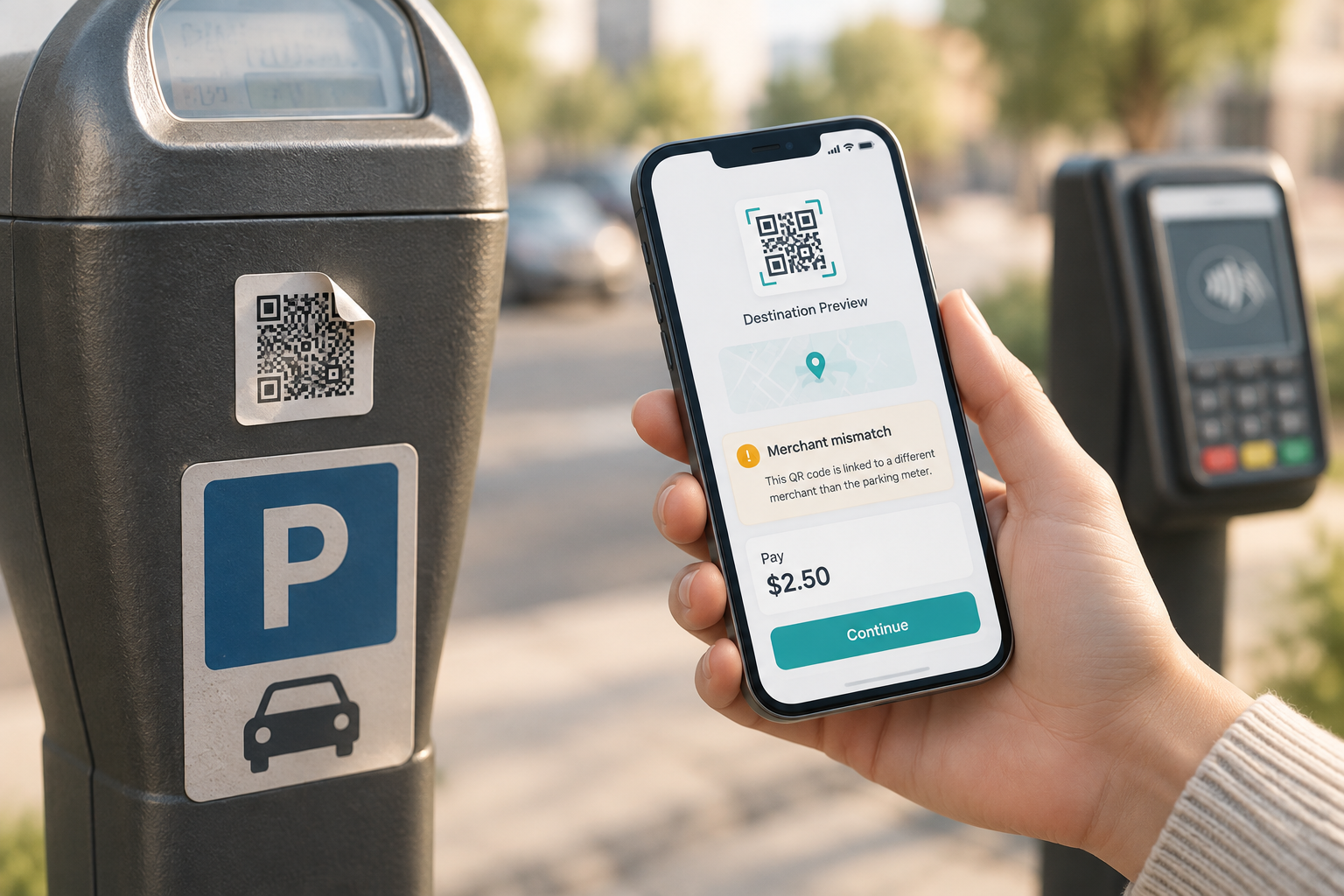
The Federal Trade Commission has described scammers placing substitute QR codes on parking meters to direct people to fake payment sites. That alert supports checking the code and destination; it does not establish how common such tampering is. The FBI’s Internet Crime Complaint Center has also warned that physical QR codes can be tampered with.
Inspect the physical QR code and its context
Check whether the code belongs where it appears before you use your phone to open it.
Take a moment to look closely at the sign, meter, menu, or payment notice. Does the QR code appear to be a sticker placed on top of another code? Are there lifted edges, mismatched materials, damaged print, or wording that does not fit the surrounding instructions? Those signs do not prove fraud, but they are reasons to pause and verify.
Compare the instructions with what you would reasonably expect at that location. For example, a parking meter may identify an official parking service, zone, or other payment option. If a code points to an unfamiliar service, or the sign asks you to pay in a way that conflicts with posted instructions, do not guess. Use a different payment method or confirm with staff or the parking operator using contact details you find independently.
A genuine-looking sign is not conclusive: a code can be changed while the rest of the notice remains in place. The FBI’s guidance recommends examining physical codes for signs of tampering and using a known, trusted web address for payment when possible. If you cannot make a reliable check on the spot, walking away from the code is a sensible option.
Preview the destination before opening it
The address is an important clue, but a familiar-looking name alone is not proof that a page is safe.
Use your phone’s camera or QR-scanning feature to display the destination first, if your device offers a preview. Read the full web address carefully before tapping it. Watch for misspellings, extra words, swapped letters, unusual endings, or a business name embedded in a longer address that actually belongs to a different domain.
For instance, a page that appears to mention a parking operator might use a web address with an unrelated business name or an extra term you were not expecting. Do not rely on a quick glance at the first few words; the domain—the part identifying the site—matters. If you are unsure which address is official, do not try to determine it from the QR code itself.
A preview is a screening step, not a safety guarantee. A link can look plausible and still lead to a misleading page, and a page that loads securely does not automatically belong to the business named on the sign. The FTC specifically advises checking QR-code destinations for misspellings or altered letters. If the address does not match what the business independently identifies as its payment site, stop.
Verify the payment through a trusted route
When there is any doubt, leave the QR-linked route and confirm the payment method independently.
Open the business’s known official app, type an address you already trust, or find the business’s contact information through a source independent of the QR code. For parking, check the operator named on official local signage or the parking authority’s own materials. At a restaurant or event, ask an employee or organizer to confirm how payment should work.
Be careful not to use phone numbers, web addresses, or support links shown only on a page you already suspect. Instead, use details from a prior bill, official app, known website, or other source you can verify separately. If staff cannot confirm the payment page, choose cash, a card terminal, or another available method rather than entering information into an uncertain site.
Using an official app or typed address may not be possible at every venue, and payment instructions differ by business and location. The FBI recommends using a known, trusted web address rather than a site reached through a QR code when possible. Treat that as a useful alternative, not a claim that every QR payment is fraudulent.
Review the payment page before submitting
Even after reaching a plausible site, check that the details fit the transaction you intended.
Before you enter or submit anything, confirm that the merchant or service name is the one you expected. Check the amount, location or parking zone, and any fee shown. At a restaurant, make sure the page is for your table or the right order if the business uses table-specific payment. For an event, check that the event or organizer matches the notice.
Consider whether the information requested is reasonable for that transaction. A page asking for extra account credentials or personal details that do not seem necessary is a reason to stop and verify, not a prompt to provide more. Do not let urgency, a countdown, or a warning that you will be penalized push you past a mismatch.
If the merchant, amount, or requested information is unclear, close the page and confirm through a trusted channel. A page can display a familiar logo or business name without proving that it is the official payment service.
| What you notice | What to do |
|---|---|
| The code looks like a sticker over another code, or the sign appears altered | Do not use the code. Choose another payment method and report the issue to the venue or operator. |
| The previewed address is misspelled, unfamiliar, or does not match the service | Do not open or use the page. Verify the correct address through an independent source. |
| The address seems plausible, but the page shows the wrong merchant, amount, or location | Do not submit payment. Confirm the details with the business through a trusted channel. |
| You cannot verify the code or payment page | Use another payment method or wait until the business can confirm the instructions. |
What to do if something seems wrong
Stop first, then take recovery steps based on what you shared or paid.
If a code, address, or payment page seems suspicious, do not enter information or press a payment button. Close the page and avoid returning through the same QR code. Contact the business or operator using independently verified details, and tell them what you noticed so they can inspect the code or notice.
If you entered card or bank information, or authorized a payment, contact your bank or card issuer promptly through its official app, the number on your card or statement, or a website you already know is genuine. Explain what happened and ask what steps are appropriate for your account. If you submitted a password, contact the relevant service through its official channel and take steps to secure the account; do not reuse a password you suspect may have been exposed.
Keep any receipt, transaction record, or screenshot that you can safely retain. Report suspected fraud to the appropriate authority in your location. Reporting options vary by country and circumstances, so use official channels rather than links supplied by the questionable page.
Your before-you-pay QR checklist
Use this short routine whenever a code takes you to a payment page.
You do not need to assume a QR payment is unsafe or spend time investigating every code. A consistent pause is enough to catch obvious mismatches and gives you a clear alternative when you cannot verify the payment.
- Inspect the sign and code for signs of a sticker, alteration, or conflicting instructions.
- Preview the destination and read the address rather than tapping automatically.
- Verify the site or payment method through a trusted app, known address, or independently confirmed contact.
- Check the merchant, amount, location, and information requested before submitting.
- Stop and use another method if anything is unfamiliar or does not match.
Frequently asked questions
Is it safe to pay with any QR code posted at a business?
Not automatically. A QR code is a convenient way to open information or a payment page, but its presence does not confirm who controls the destination. Check the code, address, merchant, and amount, and verify the instructions independently if anything seems off.
Does a link preview tell me whether a QR payment page is legitimate?
No. A preview can help you spot an unfamiliar or misspelled address before opening it, but it cannot guarantee that a site is legitimate. If you cannot confirm the destination through a trusted source, do not enter payment details.
What should I do if a parking-meter QR code looks like a sticker?
Do not scan it or use the linked page. Pay another way if you can, and notify the parking operator or local authority using contact details you verify independently.
I entered my card information on a suspicious QR payment page. What now?
Contact your bank or card issuer promptly through its official app, the number on your card or statement, or a known genuine website. Explain what happened and ask what steps to take. If you also entered a password, contact that service through its official channel and secure the account.
Sources & further reading
Explore the original sources behind this article. Our editorial perspective is separate from the organizations we reference.