How to Read a Nutrition Facts Label: Serving Size, %DV, and Added Sugars
Read a Nutrition Facts label in three passes: check serving size, use % Daily Value to compare similar foods, and separate total sugars from added sugars.
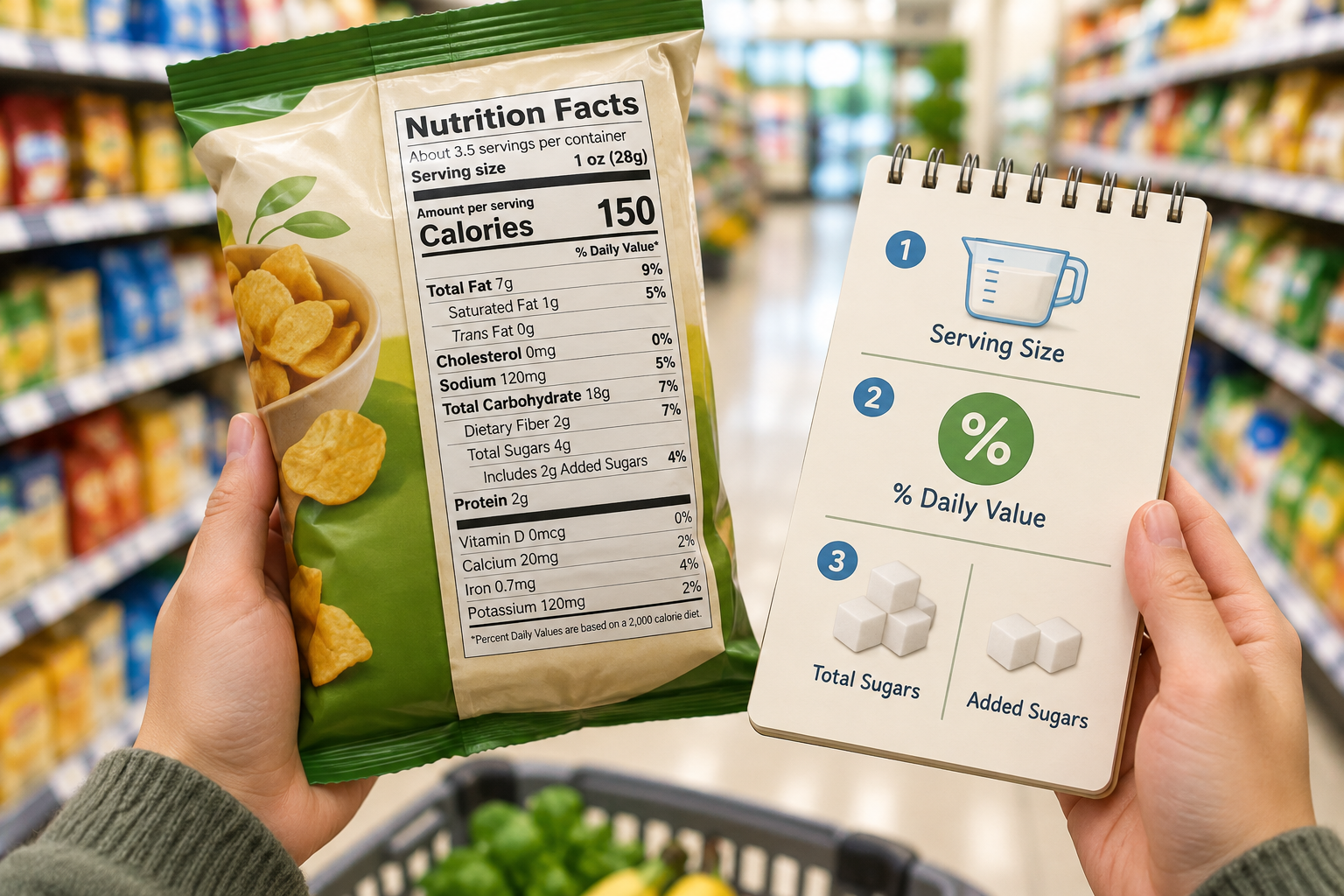
How to read a Nutrition Facts label in three passes
A quick sequence keeps the numbers in context before you compare products.
To read a Nutrition Facts label, first check what counts as one serving, then use % Daily Value (%DV) to compare nutrients, and finally look at total and added sugars separately. This routine helps you understand what the numbers refer to without turning a label into a personalized eating plan.
Keep the package in view as you read. A number that looks small may apply to only part of the container, while a high %DV is a comparison cue—not, by itself, a verdict on the food. The U.S. Food and Drug Administration (FDA) describes the label as one source of information to help people make choices.
- Pass 1: serving size and servings per container.
- Pass 2: nutrients and %DV.
- Pass 3: total sugars and added sugars.
Pass one: check serving size before the numbers
The serving details establish the basis for nearly every amount that follows.
Find “Serving size” and “Servings per container” near the top of the label. Calories and nutrient amounts generally refer to one serving. Serving size reflects an amount people typically eat or drink; it is not a recommendation for how much you should have.
Compare that stated amount with the amount you actually plan to eat. If the label lists one cup as a serving and you eat two cups, you have eaten two servings. As a simple example, if one serving lists 180 calories, two servings correspond to 360 calories. The same multiplication applies to listed nutrients, subject to label rounding.
A package is not always a single serving. Some labels show a second column for the whole package as well as one serving. Check the column heading and whether the figures are per serving or per package instead of assuming the layout.
- Look for the serving size and the number of servings in the container.
- Estimate or measure the amount you are comparing with the label.
- Multiply the per-serving amounts when your portion includes multiple servings.
Pass two: use % Daily Value to compare nutrients
The percentage is a quick way to see how much of a general daily reference amount one serving provides.
%DV shows how much a nutrient in one serving contributes to a Daily Value. The FDA’s general guide is that 5% DV or less per serving is low and 20% DV or more is high. Values between those points fall between the two guideposts.
For example, when comparing two similar soups, you could check sodium per serving and use %DV to see which supplies a smaller or larger share of the Daily Value. Apply the same comparison to a nutrient you are looking for, such as fiber. First make sure the servings are comparable; otherwise, one product may appear lower simply because its stated serving is smaller.
The 5% and 20% guide is a label-reading aid, not a personal target. Daily Values are general reference amounts, and individual needs can differ. The label’s 2,000-calorie reference is also general guidance, not a calorie goal that applies to everyone.
- Use the same nutrient and comparable serving amounts when comparing products.
- Treat 5% DV or less as a general low guide and 20% DV or more as a general high guide.
- Read the nutrient amount as well as the percentage if you need a more precise comparison.
| Label detail | What it tells you | How to use it |
|---|---|---|
| Serving size | The amount used as the basis for the listed figures | Compare it with the portion you expect to eat |
| %DV of 5% or less | A general low reference per serving | Use it to compare the same nutrient in similar products |
| %DV of 20% or more | A general high reference per serving | Notice the contribution; do not treat it as an individual prescription |
| 2,000-calorie reference | A general basis used for label guidance | Do not assume it represents your personal calorie needs |
Pass three: distinguish total sugars from added sugars
The two sugar lines describe related but different amounts.
“Total Sugars” includes sugars naturally present in foods as well as sugars added during processing or preparation. Directly below it, the label may say “Includes X g Added Sugars.” That added-sugars amount is part of the total, not an extra amount to add on top of it.
For instance, a label showing 12 grams of total sugars, including 8 grams of added sugars, indicates that 8 of the 12 grams are added sugars. The remaining amount is not identified as added on that line; it may be naturally occurring. Use the ingredient list if you want more context about what is in the product.
Some single-ingredient sugars and syrups, such as honey, may display an added-sugars %DV without grams in the usual format. If the label looks different from the standard layout, read the full panel rather than assuming a missing number means there are no added sugars.
- Read total sugars and added sugars as separate, related figures.
- Remember that the added-sugars amount is included within total sugars.
- Check the ingredient list for additional context, especially on products with unusual label formats.
A worked example: compare two portions, not just two packages
A hypothetical label shows how portion size changes the figures you are interpreting.
Imagine a snack label lists a serving as 1 cup, with 180 calories, 360 milligrams of sodium, 4 grams of fiber, 12 grams of total sugars, and 8 grams of added sugars. These figures are hypothetical and are included only to demonstrate the arithmetic.
If you eat 2 cups, that is two listed servings. The corresponding amounts are about 360 calories, 720 milligrams of sodium, 8 grams of fiber, 24 grams of total sugars, and 16 grams of added sugars. The added sugars remain part of total sugars; they are not a separate extra on top.
Now suppose you want to compare this snack with a similar product. Put both figures on a comparable serving basis first. If one label’s serving is half a cup and the other’s is one cup, compare equivalent amounts or use the per-package columns when available. %DV can then help you compare a nutrient’s share, while the actual amounts show the quantities listed.
| Label item | One serving | Two servings |
|---|---|---|
| Calories | 180 | 360 |
| Sodium | 360 mg | 720 mg |
| Fiber | 4 g | 8 g |
| Total sugars | 12 g | 24 g |
| Added sugars | 8 g | 16 g |
Common label-reading mistakes to avoid
A few easy-to-miss assumptions can make a comparison misleading.
The most common mistake is reading the numbers as if they automatically describe the whole package. Check the serving information first, especially on multipacks, drinks, and foods that are easy to eat in a larger portion.
Another mistake is treating serving size as a suggested portion or 2,000 calories as everyone’s target. Both interpretations go beyond what the label establishes. The %DV guide also does not make one nutrient a complete measure of a food’s overall qualities.
Finally, avoid comparing products by the large calorie number alone or by a single %DV. A label is useful for specific comparisons, but it does not capture every aspect of a food or your wider eating pattern.
- Do not assume a package contains one serving.
- Do not treat serving size or the 2,000-calorie reference as individualized advice.
- Do not use one nutrient or number as a complete assessment of a food.
A pocket checklist for the next grocery trip
Use the same sequence each time to make label comparisons quicker and more consistent.
When two products are similar, a consistent routine makes the comparison easier. You do not need to analyze every line on every package; focus on the serving basis and the nutrients relevant to the comparison you are making.
- Serving: What amount is one serving, and how many servings are in the container?
- Amount eaten: How does your portion compare with the listed serving?
- Nutrients: Which specific amounts matter for this comparison?
- %DV: Is the nutrient generally low at 5% DV or less, or high at 20% DV or more per serving?
- Sugars: What is the total, and how much of it is listed as added sugars?
Frequently asked questions
Does serving size mean that is how much I should eat?
No. Serving size is the amount used as the basis for the label’s figures and reflects an amount people typically consume. It is not a recommendation for your personal portion.
What does 20% Daily Value mean?
It means one serving provides 20% of the Daily Value for that nutrient. FDA guidance uses 20% DV or more as a general high reference per serving; it is not an individualized dietary target.
Are added sugars counted in total sugars?
Yes. Added sugars are included in total sugars. The “Includes” line shows how much of the total is added sugars.
Is 2,000 calories the right amount for everyone?
No. It is a general reference used for label guidance, not a personal calorie target. Individual energy needs vary.
Sources & further reading
Explore the original sources behind this article. Our editorial perspective is separate from the organizations we reference.