How to Read Weather Radar: Check the Time, Track the Loop, Verify Alerts
Read weather radar in three passes: check the timestamp and your location, identify the product and watch its loop, then verify conditions with official local forecasts and warnings.
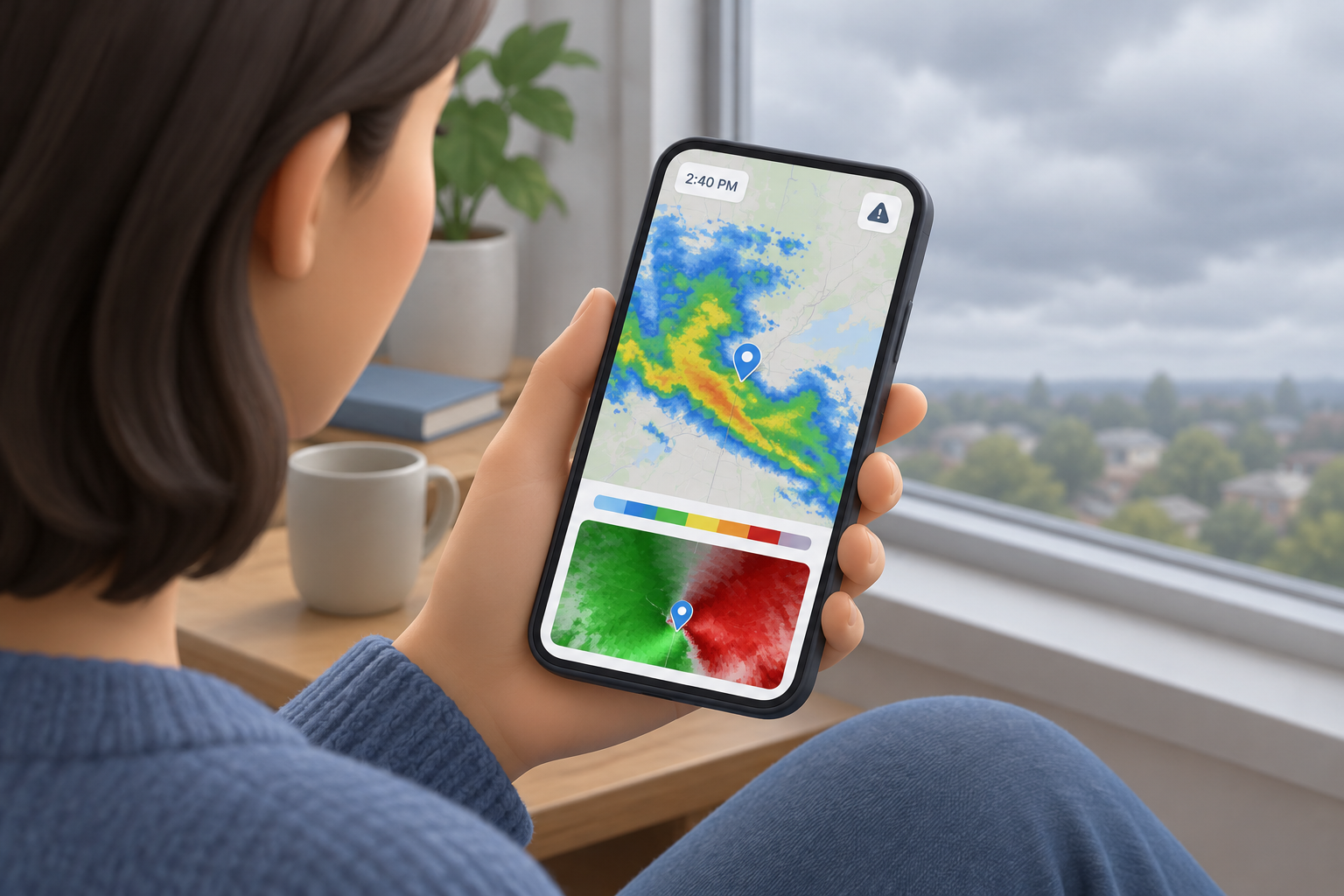
How to read a weather radar map in three passes
A few deliberate checks help you separate what the map observes from what you need to know next.
To read a weather radar map, first check when the image was collected and where you are on it. Next, identify the selected radar product and watch the animation to see how precipitation appears to move. Finally, compare the display with current local forecasts and official warnings. This three-pass approach helps you understand what is nearby without mistaking an observation for a precise forecast.
Start by asking what you need to know: where radar returns are, whether they appear to be moving toward your area, or whether an official warning applies. Reflectivity is generally useful for locating returns; a loop can provide a visual clue about movement; an official alert is the place to check for a warning.
- Time and location: Is the image recent, and where am I?
- Product and loop: What is being displayed, and what movement is visible?
- Official information: What does the current local forecast or warning say?
Check the timestamp and find your location
A radar image is an observation from a particular time, so its age and map scale matter.
Look for the timestamp near the map or in its controls. A display may update regularly, but the latest image can still show conditions observed earlier than the moment you opened it. If the animation is paused, buffering, or displaying an earlier frame, you may be looking at conditions that have changed. Check that the loop is advancing and that you are viewing the latest available observation.
Then identify your location as precisely as the map allows. Zoom in far enough to distinguish your town or neighborhood from nearby places, and pay attention to the map’s scale. A band of returns that looks close on a wide regional map may be farther away than it appears. The National Weather Service advises readers to check the image timestamp and know their location on the map.
- Read the time shown on the image rather than assuming a loaded page is current.
- Use a recognizable town, road, or location marker to orient yourself.
- If the display has a timeline, confirm that you are viewing the newest frame.
Identify the radar product before reading its colors
A color only makes sense in the context of the selected product and its legend.
Reflectivity is the radar view many readers recognize. It represents energy returned to the radar from targets such as rain, hail, snow, and ice. Brighter colors often correspond to stronger returns, which can be associated with more intense precipitation. But a color is not a universal rainfall measurement or danger rating: palettes and thresholds may differ between displays. Check the product name and its legend instead of assuming that one color always means a particular rainfall amount.
Some displays provide base reflectivity and composite reflectivity. These are different views of radar returns, not interchangeable labels for one image. If you change products, check the new product name and the display’s explanation before comparing it with the previous view.
Velocity is different from reflectivity. It depicts motion toward or away from the radar, rather than precipitation intensity. A red-and-green velocity display should not be read as a red-and-green rain-intensity map. Use the legend for the selected product: the meaning of a color depends on what the display is showing.
| Display or product | What it shows | How to interpret it carefully |
|---|---|---|
| Reflectivity | Radar returns from targets such as precipitation, hail, snow, and ice | Check the legend; stronger-looking returns do not confirm exact surface conditions. |
| Base reflectivity | A reflectivity view associated with a particular radar elevation angle | Treat it as one radar view, and check the product before comparing it with another. |
| Composite reflectivity | A composite view of reflectivity returns | It is a different product from base reflectivity; consult the display’s explanation. |
| Velocity | Motion toward or away from the radar | Use its own legend. It does not show precipitation intensity. |
Watch the loop for movement, not an exact arrival time
Animation adds context to a snapshot, but it does not guarantee what will happen at your address.
Play several frames and follow the same area of returns across the map. Ask whether it appears to be moving toward you, away from you, or across your area. A location marker can help you compare the position of a rain band or other feature from one frame to the next. If it shifts closer over successive frames, that is a useful visual clue about apparent movement.
Do not treat a short loop as a precise forecast. It is not safe to assume that precipitation will continue at the same speed and direction: it can change shape, weaken, strengthen, or move differently. The spacing and age of the frames also affect how easy it is to judge movement.
For example, a colored patch moving generally toward a town on a reflectivity map may suggest that precipitation is approaching. It does not establish exactly when rain will begin, how long it will last, or how much will fall there. Use the local forecast for those questions.
- Track the same feature across several frames rather than comparing unrelated patches.
- Treat apparent direction as a clue, not a promise about timing or impact.
- If the loop is unclear or outdated, check the current local forecast instead of estimating.
Why radar may differ from what you see outside
Radar samples targets in the atmosphere; it does not directly measure conditions at every point on the ground.
Radar readings and surface conditions can differ. One reason is the radar beam’s height: as it travels farther from a radar site, it can be higher above the ground. The National Weather Service radar guide notes that at far distances the beam may be 10,000 feet or more above ground. A return at that height does not, by itself, tell you exactly what is happening at street level below it.
A strong return is not a direct measurement of the amount of precipitation reaching your yard, and a colored patch does not establish whether conditions are dangerous where you are. Use local observations and official forecasts for context. Do not assume that an absence of returns on the map proves there is no hazard.
Radar also does not supply every kind of weather information. For example, lightning information comes from a different source, so do not assume a reflectivity image shows where lightning is occurring.
Verify local forecasts and official warnings
Use radar to understand an observation, then check official local information for forecasts and alerts.
A radar image can help you see where returns are, but it is not itself an official warning. Check National Weather Service information for your location to see the current forecast and any active alerts. Some NWS radar displays show warnings and forecasts alongside radar; these remain distinct information layers. Read the warning itself rather than inferring one from a colored area on the map.
Check the warning’s location and timing to determine whether it applies to your area. If an official alert is in effect, follow its instructions rather than waiting for a particular color or radar pattern to appear. The NWS describes warnings as official products issued through its warning process; radar observations are not a substitute for those alerts.
For an immediate safety decision, rely on current local official forecasts and warnings, not an arrival-time estimate from a radar loop. This guide explains how to interpret a display; it does not predict a specific storm or replace emergency instructions.
Use this quick weather-radar checklist
A five-point routine can help you interpret the display and decide what information to check next.
Work through these checks in order whenever you open a weather radar map. If a product or legend is unclear, look for the display’s explanation rather than guessing.
- Timestamp: Is the image current, and is the loop advancing?
- Location: Can you identify your town or area accurately?
- Product: Is the display reflectivity, velocity, or another product, and what does its legend say?
- Loop: What general movement is visible across several frames, without treating it as a precise arrival forecast?
- Official alert: What do the current local forecast and any warning say?
Frequently asked questions
Do bright colors on weather radar mean dangerous weather?
Not by themselves. On reflectivity displays, brighter colors often correspond to stronger radar returns, but colors vary by display and do not establish exactly what is reaching the ground or how dangerous conditions are. Check the product name, legend, and official local alerts.
What do red and green mean on radar?
It depends on the selected product. On a velocity display, contrasting colors can indicate motion toward or away from the radar; they do not show precipitation intensity. On a reflectivity display, colors represent radar returns according to that map’s palette. Always check the legend.
Can a radar loop tell me exactly when rain will reach my location?
No. A loop can help you judge general movement, but precipitation can change direction, shape, or intensity. Use the local forecast for timing rather than calculating an exact arrival time from a few radar frames.
Why does radar show precipitation when it is not raining where I am?
Radar samples the atmosphere, not conditions at every point on the ground. At greater distances, the beam may be higher above the surface, and a return does not prove that precipitation is reaching your location. Check local observations and the current forecast.
Does weather radar show lightning or warnings?
Do not assume a reflectivity image shows lightning; lightning information comes from a different source. Some radar displays include warning information, but a radar return is not itself a warning. Check the official alert and forecast for your location.
Sources & further reading
Explore the original sources behind this article. Our editorial perspective is separate from the organizations we reference.
- [S1] Appendix C - Basics of Weather Radarweather.gov
- [S2] New Radar Webpage (RIDGE2) Frequently Asked Questionsweather.gov
- [S3] Warnings (issuance process)weather.gov